Want to make a change or add after making the reservation? This is possible with the KLM Manage Booking tool. KLM’s “My Trip” portal will be your digital co-pilot that will give you complete control of your travel plans. The platform is created to be user-friendly, enabling you to handle fundamental aspects such as flight changes and cancellations while also catering to the preferences for additional comfort. You can get additional leg room, upgrade to Business Class, or pre-pay for extra luggage at a discount within minutes. It’s not only an effective logistics center but also a place to get real-time updates and document management. From a frequent flyer to a first time user, “My Trip” makes your travel time flexible, organized, and just right for you before you even arrive at the airport.
What Can I Actually Change in the KLM ‘My Trip’ Portal?
With KLM Airlines manage booking, you have complete control over your booking. The feature is designed to provide peace of mind to passengers to tackle the changes after the booking. You can make the following changes with your booking.
1. Flight Change
When you come across a sudden change in plan and now you have to change your destination or date of your booking, you can simply access “My Trips” to make the required changes. Here are some points to consider:
- Flight changes can be requested for free within 24 hours of the booking, given the departure still has seven days left.
- Flight changes requested after 24 hours are subject to paying a flight change fee.
- The flight change fee does not apply to Flex tickets.
- A fare difference is unavoidable under any circumstances and must be paid to apply the flight change.
2. Flight Cancellation
Move to the KLM Manage My Booking and cancel a part of or the complete journey. All you need to do is enter your booking details and locate your booking, and you can easily cancel the booking. Here are some points about the KLM Cancellation Policy to keep in mind:
- The cancellation request must be submitted before completing the check-in.
- Light and Standard tickets will be charged with a cancellation fee upon canceling the flight.
- Flex tickets can be canceled for free.
- Flights canceled within 24 hours do not have to pay the cancellation charges regardless of the fare types.
3. Name Change:
KLM Airlines can deny boarding if your name does not match the passport or government-issued ID card. Therefore, you must fix your name through the“manage booking KLM” option before boarding the flight. Here are a few things you must know:
- The name change must be made before the check-in period.
- Name changes requested well in advance are free, while changes made at the airport may incur a $15 fee.
- A passenger with a reward ticket must contact the Flying Blue customer service to request the name change.
4. Cabin Upgrade
When it comes to elevating your travel experience, the “My Trips” tab is the most direct route to a more comfortable cabin. Simply enter your travel details and explore your options in Premium Comfort and Business Class. Here are things to know:
- To obtain the cabin upgrade, the passenger must meet the fare difference.
- The cabin upgrade is not available to passengers traveling with an infant or pet.
- KLM Airlines does not allow passengers who need wheelchairs or medical assistance to request a seat upgrade.
What Add-Ons Can I Purchase Through KLM Manage Booking?
With the KLM flight manage my booking, you can tailor your trip more than just the ticket. These add-on services are not only available online but are also generally much easier to buy online than at the airport. These are the main add-ons you can get directly from the portal.
1. Extra Baggage:
If you know that you will be bringing home more than what you have checked, you may buy extra checked bags or add another bag to your weight limit.
- The Benefit: You typically save 20% with the addition of baggage bought through the “My Trip” section at least 24 hours before your travel when compared with airport pricing.
2. Preferred Seating
Do not take your comfort for granted at check-in, as the best seats are taken first. The KLM manage booking online seat map allows you to pick:
- Economy Comfort: More legroom and a further-reclining seat.
- Extra Legroom Seats: Most often seats in the exit row to allow for the most stretching room.
- Front Section Seats: Sit in the front section seats first to get off the aircraft.
- Standard Selection: Making sure to sit by your fellow travelers.
3. Enhanced Dining (A La Carte Meals)
Opens on most KLM long-haul flights from Amsterdam, offering the possibility to exchange the standard flight with a specially customized A La Carte meal. Choices often include:
- The Italian Meal: Traditional pasta and Mediterranean flavors.
- Healthy or Celebration Meals: Designed for health or indulgence.
4. Onboard Connectivity (Wi-Fi):
Don’t fumble with your credit card in the air, but buy a Wi-Fi pass ahead.
- Messaging Pass: It is typical that basic messaging applications are free.
- Surf or Stream Passes: These are available for purchase and will allow you to be connected immediately after the “Safe to use electronics” light turns on.
5. Lounge Access
In need of a break from the hustle and bustle of a terminal? Passes for KLM Crown Lounges (at Schiphol Airport and a few others) are available at the time of booking or later through KLM Manage My Booking. The benefits of lounge access include the following:
- Meals: Get free beverages and meals while waiting for your flights.
- Services: You can take a shower, go to the spa, or have your favorite drinks in the bar area.
6. Special Services
In addition to the services mentioned above, you can also add the following services through KLM Royal Dutch Airlines Manage Booking:
- Pet Travel: A dog/cat can be added to your booking (subject to space and breed availability).
- Sports Equipment: Register items such as bikes, surfboards, or golf clubs.
- Special Assistance: For unaccompanied minors, request wheelchair service or assistance.
Read Also – Singapore Airlines Manage Booking
What Details Can I View Through Manage My Booking?
Get every detail of your upcoming booking through the “KLM Flight Manage Booking” and make your travel more comfortable. The “My Trip” portal is essentially a digital summary of your entire travel contract, which has brought the flight details to your fingertips. Get the following information:
- Flight Schedule: You can view the confirmed flight departure and arrival times, flight number, or layover duration (if any).
- Real-Time Status: The passengers can check the travel alerts, departure gate, gate changes, and flight delays.
- Ticket Details: Check the ticket details to find out your fare type or confirm the name and other details are right.
- Refund Status: If you have applied for a refund, you can view the live status of your refund request through KLM Airlines manage booking.
- Flying Blue Details: Find out how many miles and XP (experience points) you will receive from your flight, depending on your ticket type, cabin class, and route. These rewards can lead to benefits, upgrades, discounts, and higher Flying Blue membership levels.
Pro-Tip: “The Mobile Sync”
When you look at these details not in a web browser, the KLM App will automatically “save” your trip! This enables you to see your flight information and gate without signal on a busy foreign airport.
How Can I Manage My Booking With KLM?
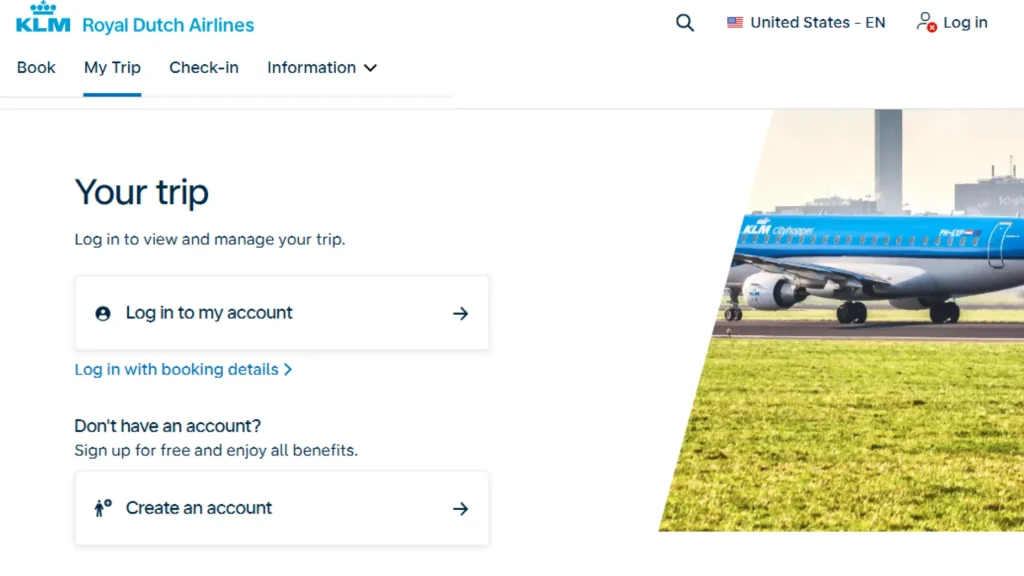
Since you already have all the necessary details, you may be wondering how to manage your KLM booking. Fortunately, managing a KLM reservation is simple and convenient, with several options available depending on your preference. Whether you prefer using online channels for quick modifications or seeking in-person assistance, KLM offers both convenient options to manage your booking with ease.
Online Modes
By using the online channels, you can manage KLM booking or add-ons quickly without getting a KLM representative in between.
1. Through the KLM Website (“My Trip”)
- Go to the official KLM website.
- Look for the “My Trips” tab located at the top of the page.
- Based on your ticket, log in using your Flying Blue credentials or enter your Booking Code and your Last Name.
- Once your itinerary is displayed, you can modify the details.
- Make the changes to your booking and pay the applicable charges to apply the change.
- You will receive a confirmation email after completing the payment with an updated ticket.
2. Through the KLM Mobile App
- Open the KLM app on your device and log in to your Flying Blue account, or keep your booking code handy.
- Find “My Trips” at the bottom of the screen.
- Tap on the upcoming details; if you cannot view the details, tap on “Add a Booking” and enter your last name and booking code.
- Select an option and proceed with the on-screen instructions.
- Pay the applicable charges to apply the change.
Offline Modes
In case you are looking for assistance with manage KLM flight booking, you can speak to one of their representatives.
1. Via Telephone (Customer Contact Center)
- Make a call to the KLM customer contact center.
- Share your booking code with the agent.
- Request the change you want to make with the ticket.
- Pay for the change and get the confirmation email.
2. At the Airport Counter
- Visit the KLM check-in counters, self-service kiosks, or the dedicated KLM service desk at the departure airport.
- Provide your booking code, e-ticket number, and passport to the agent.
- State the changes or add-ons you want to make on your ticket.
- The agent will calculate the charges, pay the fee, and receive your new boarding pass.
Read Also – Air France Manage Booking
Conclusion
The KLM Manage Booking feature provides a convenient and flexible solution for travelers to manage their bookings easily. Whether it means altering flights, cancelling tickets, upgrading cabins, or buying add-on services, the “My Trip” portal empowers passengers to take full control of their trips. It can be done online via the website or in-app or offline via the telephone or at the airport; KLM has got you covered. Visit Fly Airlines Policy to find out more useful airline travel guides, policies, and information on how to book your flights.
FAQs – KLM Manage MY Booking
Yes, if you make the cancellation request within the first 24 hours of the booking, the airline will waive the cancellation charges. After 24 hours, it depends on your fare type, and only Flex tickets are eligible for a free cancellation.
You cannot modify your flight details after completing check-in. To make any changes, you must first cancel your check-in. Once the check-in is canceled, you will be eligible to access the flight change option through the official KLM website or mobile app.
When you rebook your flight, KLM automatically transfers your extras to your new booking. However, if the extras on the new flight cost more, you must pay the difference.
No, you cannot edit your name manually. Thus, you must contact the airline’s representative to request a name change.
Yes, the KLM Manage My Booking tool can be used to add extra services to the booking by paying the additional charges.
Read More –