Sometimes even air travel is stress-related, particularly in the event of very long queues in the airport or unforeseen delays. Fortunately, Cathay Pacific Online Check-In offers passengers to check in at the comfort of their home, office, or mobile device conveniently. This is a strong advantage, especially with international flights, family travelers, and hectic business travelers.
This guide will help you with all the information you need to know about Cathay Pacific online check-in, including the time, the process, bags, selecting seats, mobile check-in, the kiosk at the airport, and special consideration. By the end of this article, you will completely understand the insights of Cathay Pacific online check-in.
What is Cathay Pacific Online Check-In?
Online check-in is a web-based service provided by Cathay Pacific to enable clients to check in to their flights without having to go to the airport counter.
With the online check-in, the travelers will be able to:
- Avoid long queues at the airport
- Select preferred seats
- Provide more services, including extras of baggage or meal preferences.
- Obtain their boarding pass and have it printed or save it on their mobile.
Check-in online is also offered on most international flights or on some domestic flights, as it is a convenient and flexible option.
Key Advantages of Checking In Online
Cathay Pacific gives customers a check-in option that is online, as an alternative to the regular check-in counters in the airport. It does not only save time using this service but also improves your total experience in traveling.
Time-Saving Convenience
Among the major benefits of online check-in, it is possible to avoid long queues at the airport.
Online check-in passengers find it simpler to proceed to baggage drop as they have their luggage checked in. Those who only bring a carry-on bag can take advantage of the online check-in and sometimes avoid the counter altogether and go directly to the security checkpoint. This lessens stress, particularly when there is a peak in traveling or when there are high-traffic international airports.
Example: A tourist on a flight between Hong Kong and London can book online and spend less time in a 30 to 45-minute queue, which will offer them time to unwind or use other facilities provided by the airport.
Convenience from Anywhere
Online check-in will enable you to check in where you are, at home or in the office and on the move, through your smartphone or tablet. Offered up to 24 or 48 hours to departure, the service provides you flexibility in your traveling schedule. Perfect in the early morning or late afternoons when the flights are such that one does not have to be there hours beforehand just to be checked in.
Secure Seat Selection
Online check-in also provides the passengers with the chance to select preferred seats prior to travel, which include:
- Aisle or window seats.
- Extra legroom options
- Seats being towards the front of the cabin to board and alight faster.
Booking seats early helps to save the chance of attaining your preferred seating, especially during long flights or when you are traveling with a group.
Tip: Upgraded seating can be accessed by business and premium economy customers during online check-in.
Availability of Food and Beverages
Online check-in enables passengers to book additional onboard services prior to landing at the airport, and they include the following:
- Extra baggage allowances
- Food preferences based on diet need.
- Upgrade options for higher-class cabins
It can be helpful to book these services online, which can make your way to the airport a lot easier and save the money that you will spend when getting there right away.
Eco-Friendly Travel
Mobile boarding passes minimize waste by reducing the amount of paper that is disbursed towards more sustainable travel practices. The passengers will be able to save the boarding passes on their mobiles or email, thus doing away with printing them out.
Tip: Remember to save your boarding pass and have it stored in your email or a traveling app just in case your phone battery goes down.
Timing for Online Check-In with Cathay Pacific
The timing of checking in online is important in order to have a trouble-free travelling experience. The Cathay Pacific gives vivid windows on online check in basing on your type of flight and route. By adhering to these tips, you are guaranteed of getting the seat you want, preventing any delays, and time to access other services prior to flight.
International Flights
In case of international travel, Cathay Pacific online check-in service will be available to enable bookings within the 24 hours of the actual time of departure booking.
- Cut off: 24 hours before departure.
- Last Check-in Window: 90 minutes prior to takeoff.
International traveler tips:
- Check Travel Documents: Having the passport, visa, and any other required document ready is essential before starting to check in over the internet.
- Seat Choice: It is now when you get to choose the seat that you want, like extra legroom, a window, or an aisle seat.
- Baggage Management: Prepare additional baggage or special services online to save time at the airport counter.
- Mobile Boarding Pass: Check-in, then download your boarding pass on your phone or print it to be handy.
Example: When your Hong Kong-London flight is 10:00 AM, online check-in will open at 10:00 AM the day before and close at 8:30 AM when your flight takes off.
Local Flights (Choose Routes)
The online check-in window for domestic routes works the following way:
- Check in: 48 hours prior to departure.
- The last call: 60 minutes prior to takeoff.
Tips for Domestic Travelers:
- Additional Flexibility: This means some domestic operations have an earlier check-in time, and you will have more time to confirm seats, or make amendments.
- Early Arrival: Arrive early at the airport even though it needs less time to fly when you need to drop baggage that the airline has been asked to check or demand their services.
- Timing Changes: You should always make sure to check beforehand the check-in timing on your specific route, as the airport regulations might shift these timings slightly.
Methods of Online Check-In with Cathay Pacific
Cathay Pacific provides various, convenient ways of passengers checking in, and it is flexible. You may feel comfortable on a computer, mobile phone or on an airport machine; but each of the options will eventually make life easier on your way, cut overall waiting lines and allow you to take charge of your trip.
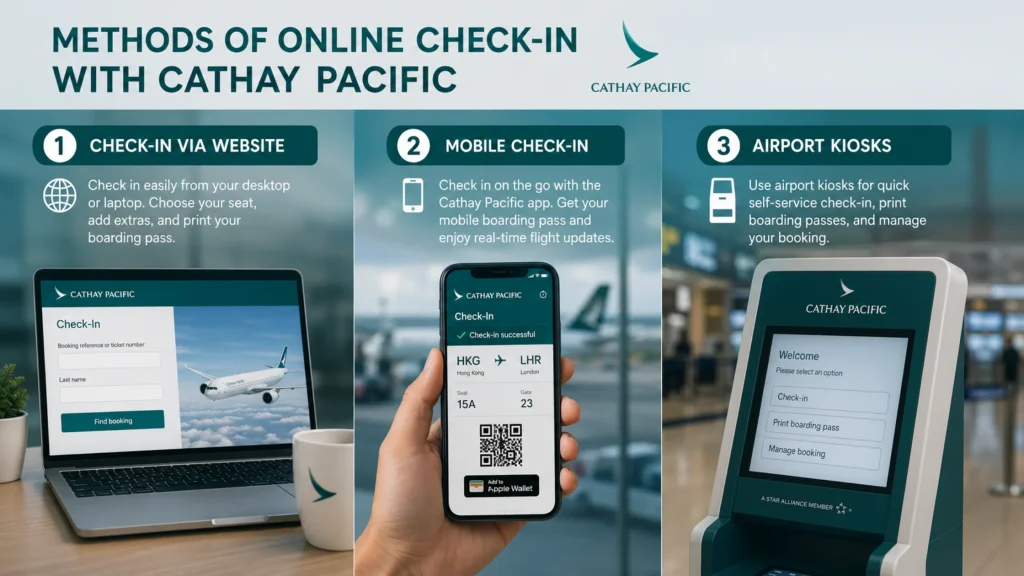
1. Check-In via Website
The Cathay Pacific site is best to check in when a traveler likes a desktop/laptop interface. It enables complete access to all check-in options as well as other services.
Step-by-Step Guide:
- Go to the official website of Cathay Pacific.
- On the homepage, click on theCheck-In.
- Your name and booking number or ticket number.
- Choose the flight in which you want to check in.
- Check flight and personal information.
- Choose your seat and add any extra services, such as:
- Additional baggage
- Meal preferences
- Upgrade options
- You can print your boarding pass or download a PDF version at your convenience.
Tips for Website Check-In:
- Triple check your passport information in case of international flights. Any discrepancy may lead to airport delays.
- Ensure that your name is exactly correct with your traveling documents. Check-in problems can be caused by even minor differences.
- When traveling overseas, you may also want to consider printing two copies of your boarding pass, in case the first is lost.
2. Mobile Check-In
The passengers can have extra benefits when they check-in through the mobile app of the airline. They can access the boarding pass even if it’s not downloaded or internet is not working.
Mobile Check-In can be done using the following steps:
- Get the Cathay Pacific App on the App Store or Google Play.
- Open the app and select Check-In.
- Provide your booking number or ticket number.
- Check your flight and passenger information.
- Choose seats and specify extra services (where necessary).
Note: Save your mobile boarding pass to a device or mobile wallet.
Benefits of Mobile Check-In:
- Environmentally friendly: Will help to prevent the use of paper since it will have a digital boarding pass.
- Live Tracking: Get real-time updates on flight delays, gate assignments, and updates on other valuable notifications.
- Convenient access to airports: Just present the mobile boarding pass on the security checks and boarding gates.
Pro Tip: Be sure your phone is charged completely and have a copy of a screenshot of your boarding pass in case of any problems in the app.
3. Airport Kiosks
Cathay Pacific also offers passengers self-service kiosks in key airports in case of self-service when passengers have forgotten to check in online.
What You Can Do at Kiosks:
- Print boarding passes and baggage tags.
- Select seats and make minor adjustments to your itinerary.
- Check in fast in a few minutes and do not have to stand in a long queue at the check-in.
Tips for Using Kiosks:
- Reach the kiosk early, as sometimes it can be long, especially during peak times.
- Keep your booking code or ticket number to hand so that you can fast-track the process.
- Kiosks are convenient for late arrivals or travelers who are unable to check in through mobile or online.
Read Also: – Delta Online Check In
Special Considerations During Cathay Pacific Online Check-In
Although online check-in is convenient and can be very flexible, there are special considerations to be made to make the traveling experience a smooth one. When checking in online passengers should be aware of baggage policies, traveling with pets and accessibility requirements.
Baggage Considerations
- Standard Allowances: The allowance of baggage collected depends on the fare class and the route.
- Economy Class: 1-2 checked bags are the norm depending on the type of ticket.
- Premium Economy / Business / First Class: Higher allowances are applicable usually accompanied by extra checked bags.
- Online check-in gives the passengers the chance to check baggage allowance prior to reporting to the airport.
- Adding Extra Baggage: Among the benefits of the online check-in is the fact that it is possible to pre-purchase additional baggage at a considerable discount compared to airport rates. To ensure they do not face any surprises at the last moment, passengers can indicate the weight, number of bags, and type of baggage online.
Note: There are also weight and size limitations depending on the policy of Cathay Pacific in carrying baggage and therefore, make sure that your baggage conforms to the guidelines of the airline, as this will prevent charges in the airport.
Traveling with Pets
- Passengers with pets do not have the opportunity to check in online.
- Pets need to be given special handling at the airport because of documentation, health certificates, and cargo.
- The airlines demand pets be checked at the counter where the personnel can confirm
- Health and vaccination papers.
- IATA-compliant crates
- Reservations in the cargo hold
The owners of pets are recommended to be able to get to the airport earlier than usual to afford a few more minutes to be able to check in and handle.
Tips: Before traveling with your pet, it is advisable to call Cathay Pacific and ensure that the travel of your pet is confirmed and all the documentation is ready.
Passengers with Special Needs
- Mobility Assistance/Wheelchair: Customers who need wheelchairs, mobility aids, and other special services should inform the airline online check in or directly contact the customer care service. Online check-in gives passengers options of available seating when available, although boarding, deplaning, and transfers require the assistance of the airport staff.
- Other Special Needs: Travelers with any dietary needs, using their medical equipment, or having an infant traveling will have to go through and book services online. Preapproving these needs will enable Cathay Pacific to be able to accommodate these requirements and prevent delays.
How to Get Your Boarding Pass
Obtaining your boarding is easy with Cathay Pacific. There are various methods through which one can acquire their boarding pass.
Printed Boarding Pass
- Description: Once the online check-in has been completed, the passengers are capable of printing the boarding pass either at home or at the office.
- Advantages: Gives a hard copy so that it is easily accessible at the airports’ checkups. No need to worry about international use, compatibility of apps or lack of an internet connection.
- Tips: In case they lose it, it is advisable to print at least two copies of international travel. Make sure that your name and flight number are the ones on the passport.
Mobile Boarding Pass
- Description: The boarding pass will be saved directly in your phone wallet.
- Advantages:
- Environmentally friendly
- Minimizes paper
- Convenient
- It can be easily accessed on your mobile device at airport security and boarding gates.
- The passenger can get real-time updates on flights, gates, and delays.
- Tips: Make sure that your phone is charged to capacity before getting to the airport. So in case of a bad connection or bad application, have a copy of your boarding pass in the form of a screenshot. When traveling worldwide, make sure to bring your passport and mobile boarding pass.
Kiosk Boarding Pass
- Description: Printing boarding passes onsite whereby you use self-service kiosks in the airport.
- Advantages: Fast and easy in case you did not check in online. Provides the passengers with opportunities to select or reshuffle seats prior to printing. Is also capable of printing baggage tags on the checked luggage, simplifying the process at the airport.
- Tips: When going through a kiosk, get there early and during rush times. Please carry a booking reference or a ticket number to quicken the procedure.
Seat Selection and Deadlines During Cathay Pacific Online Check-In
There is more to online check-in than confirmation of your flight; you have a chance to select the finest seat, add-on services, and have a hustle-free airport process. Knowing what seats to take and check-in times will help the most in regard to comfort and ease of access.
Seat Selection During Online Check-In
When checking in online, Cathay Pacific passengers get to choose the seats they want to sit in, having more control over their experience aboard.
- Types of Seats: Standard Seats: Generally, they are free of charge and included in your fare. Premium Seats: Provide additional legroom or closer access to exits; there might be additional charges. Window Seats: Ideal scenic scenery seats and a part leaning on the cabin wall. Aisle Seat: have a greater degree of mobility and access to lavatories.
- Group and Family Seating: When families are traveling together, they can also choose seats that are near to each other in order to keep in touch. The early check-in (online) increases the possibility of retaining groups, especially in the full flights.
Tips for Optimal Seat Selection:
- Close to the Wing: Seats on the wing are a less turbulent ride.
- Early Check-In: The sooner you check in, the higher the opportunity to have premium or preferred seats.
- Balance Needs: Select window seats to watch views and take naps and an aisle to have room and move.
- Special Needs: Passengers who must use a wheelchair or need additional help must book accessible seats when making a reservation or call customer service.
Online Check-In Deadlines
It is important to be aware of the time online check-in starts and ends to book tickets in advance and not to be stressed at the last moment. The time limits vary according to the type of flight and route.
| Flight Type | Online Check-In Opens | Online Check-In Closes | Airport Counter Closes |
| International | 1 day prior to departure | 90 minutes prior to departure | 45 minutes prior to departure |
| Domestic ( Select Routes) | 48 hours prior to departure | 60 or 45 minutes prior to departure. |
Important Notes:
- Flight-Specific Timing: Be sure that the check-in time of your flight is at the correct time since airport-specific restrictions or country policies can narrow the check-in time by a few seconds.
- Early Check-In Advantages: When you check in early, it provides more options of seats to select. And also, there will be shorter wait times at airport counters and security. Additionally, you will get time to process special requests, baggage additions, or upgrades.
Recommendations:
- Reminders to online check-in openings will be set to have as many seats as possible.
- The passengers should check in early for international flight to allow them enough time for document verification at the airport.
- Early check-in can still be observed by domestic travelers as common routes may often become congested early, which restricts finding seats.
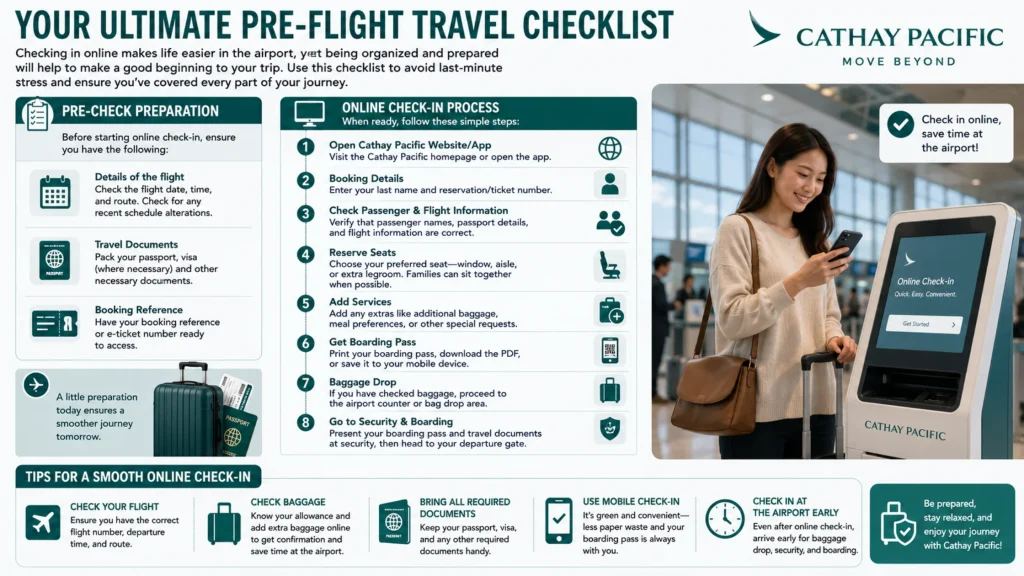
Your Ultimate Pre-Flight Travel Checklist
Checking in online makes life easier in the airport, yet being organized and prepared will help to make a good beginning to your trip. The use of a checklist enables you to shun the last-minute rush and makes sure that you have considered every element of your trip.
Pre-Check Preparation
Before starting online check-in, ensure you have the following:
- Details of the flight: Check the flight date, time, and route. Check for any recent schedule alterations.
- Travel Documents: pack your passport, visa (where necessary) and other necessary documents.
- Booking Reference: You are expected to have your booking reference or e-ticket number to have in hand in order to access.
Online Check-In Process
When ready, do the following steps:
- Open Cathay Pacific Website/App: Access the home page of the Cathay Pacific or activate an app.
- Booking Details: Type last name and reservation/ticket number.
- Check passenger and flight information: Passenger names, passport and flight information are correct.
- Reserve Seats: Reserve seats, remembering that there is window, aisle, or extra legroom. When it is possible, families can choose to sit in a group.
- Add Services: Add any extras like baggage, dining options or add-ons.
- Get Boarding Pass: You can either print the boarding pass, download the PDF, or save smartphone.
- Baggage Drop: In case you have baggage, then come to an airport counter or bag drop to drop your baggage.
- Go to Security & Boarding: Swipe in with boarding pass and travel paperwork and pass through the security checkpoint to your departure gate.
Tips for a Smooth Online Check-In:
- Check Your Flight: You must ensure that you have the right flight number, the departure time and the route.
- Check Baggage: To receive confirmation and save some time at the airport get acquainted with your allowance, book additional baggage online.
- Bring all the required papers: a passport, a visa and any other papers should be available to check.
- Use Mobile Check-In: Green and easy; less paper waste and boarding passes are easily accessible.
- Check into the Airport Early: Checked into the airport online, but get plenty of time to have bags checked in, go through security, and board.
Mobile App Advantages and Family-Friendly Online Check-In with Cathay Pacific
Mobile App Benefits and Family-Friendly Online Check-In with Cathay Pacific. The online services offered by Cathay Pacific are meant to offer flexibility and convenience as well as add value to the travel experiences. The mobile application benefits and family-oriented online check-in are two important qualities that ensure passengers can save time, remain updated, and travel comfortably.
Advantages of the Cathay Pacific Mobile App
The Cathay Pacific mobile application is not a mere check-in app; it acts as a comprehensive travel assistant throughout your trip.
- Real-Time Flight Updates: Get immediate updates regarding flight status, delays, gate assignments, and boarding. Helps travelers be more efficient in planning the arrival time at the airport and minimize waiting time.
- Add Extra Services: With the app, passengers have the opportunity to buy extra baggage, upgrade the seat, or select the food preferences. Saves the time spent waiting in line at the airports and makes your traveling experience personal to you.
- Digital Boarding Passes: The digital boarding pass may either be stored in your digital phone or a mobile wallet. Green: Does not use paper. Easy: Easy access into the security checks, lounges, and boarding gates.
- Airport Navigation and Information: The application offers terminal maps, gate data, and airport navigation devices. Perfect to use when making a flight change or at major airports. Ability to help find lounges, bathrooms, check-in desks, and baggage desks effectively.
Online Cathay Pacific Check-In Family
Taking children or more than one or two family members would involve additional planning. Online check-in has made family traveling more stress-free and organized at Cathay Pacific.
- Selection of seats: Families: Families can book seats together, which means that parents or guardians can be chosen as close to children as possible. Early check-in enhances the chances of a family remaining together, particularly full flights.
- Infant Legroom: Unless there are fewer than two empty seats in a row, passengers carrying infants can book additional leg seats so that they can store a stroller, a bassinet and other comfort-related requirements. Such seats are not very popular and therefore it is advisable to check in in advance through the internet.
- Boarding Order and Convenience: Early check-in may also aid the boarding order management among families so that parents may board first with small children. Makes sure that the infants and toddlers are settled prior to filling the main cabin with other passengers.
Tips for Families:
- You need to have important things such as diapers, snacks, and toys that are carried by bags.
- Check that passenger records are accurate against travel documents of all family members.
- Verify on the online check-in or the app, e.g., request at the app or dine with the entire family child meals or bassinets.
Read Also: – British Airways Check In
Conclusion
Cathay Pacific online check-in is a convenient, time-saving service for all passengers and is user-friendly. Travelers are able to check in and select their seats as well as choose their services using the site, whether on mobile or at the airport kiosk before they arrive at the airport.
Applying the instructions given in this guide and packing documents and baggage before traveling will help the passengers to reduce the stress on their trip and have a more relaxing experience. Online check-in is a system that has become indispensable in today’s air travel, offering flexibility, ease, and enough assurance.
FAQs – Cathay Pacific Online Check-In
You are allowed as much as 48 hours prior to your flight to check in online. Most flights have a 90-minute check-in before departure, with some flights having a slightly different cut-off time.
Yes! In Cathay Pacific, customers will be allowed to check in on their website or mobile application. It is fast and convenient and you are provided with the option of selecting your seat and receive the boarding pass without queuing at the airport.
There are three choices to do it:
Mobile boarding pass – obtained on account of an online check-in via the application or email.
Print at home boarding pass—print following online check-in.
Airport counter or kiosk—the staff will print it on your account as you did not check in online.
Not necessarily. Cathay Pacific supports mobile boarding pass using your phone or some other device. Nevertheless, certain international airports might demand a paper boarding pass, with which it is best to research the regulations of your departure airport.
The most commonly confiscated items are liquids, gels, and sharp objects in carry-on bags. Items like oversized bottles of water, scissors, pocket knives, and certain electronics can be taken away at security checkpoints. Always check the airport and airline’s prohibited items list before traveling.
The screenshot of your mobile boarding pass is usually accepted as long as it is properly shown and the barcode is completely clear, bright, and easy for airport scanners to read. Remember to charge your phone and get a clear image at the security and boarding gate.
Read More: –